


USGA
4.4117.00 Reviews
App Specs
- Version
- 4.6.4
- Updated On
- License
- Free
- Downloads
- 100,000+
- Developer
- United States Golf Association, USGA
- Categories
- Sports
- Platform
- Android
Screenshots


 Analysis by AppCompare
On a shared phone, a golf app can be useful for more than checking something during a round: one person might want championship updates, another may be sorting out a rules question, and a younger player may simply be curious about the sport. I find that kind of shared use works best when everyone knows whose account or personal details they are using. The USGA app is made by the United States Golf Association and focuses on golf, with its official role tied to USGA championships. That gives it a more specific purpose than a general sports app, but it also means it is not automatically the best choice for every golfer in a household.
A useful companion, with a clear focus
The app is free, and its audience is broad: the content rating is Everyone. It has an average rating of 4.4 from around 1.1 thousand ratings, with over 100 thousand installs. Those figures suggest a well-used golf app, though I would treat them as context rather than proof that every feature suits my own needs. Its current version is 4.6.4, and it requires Android 10 or later, so an older Android phone may not be able to run it. The developer is the USGA, which makes the app especially relevant to fans following that organization’s championships.
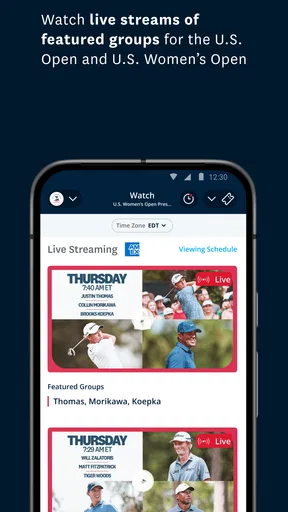
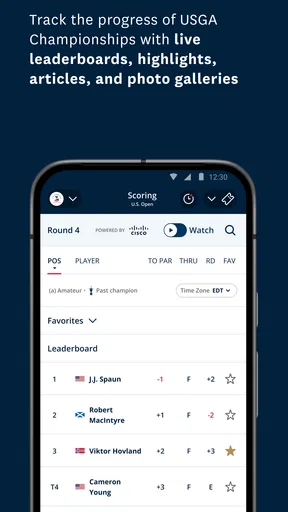
If what I want is a single place to follow U.S. Open or U.S. Women’s Open coverage and other USGA championships, this is a natural option to consider. If my priority is tee-time booking, course discovery, or a broad collection of local golf services, I would compare it with apps designed around those jobs instead. The distinction matters: a championship-focused app can be valuable without replacing every tool a golfer uses.
Sharing a phone without sharing assumptions
Picture a Saturday morning when one person in the family is watching a championship, while another is trying to settle a rules question before heading out to play. Passing the phone back and forth is simple enough, but I would avoid assuming that everyone’s personal preferences, saved information, or account activity will stay separate. On a shared device, it is sensible to check which profile is active before changing anything and to return the phone in a neutral state when finished.
That is practical housekeeping, not a claim that the app has family profiles or parental controls. I would not choose it on the assumption that it can manage several household members independently. If several golfers want separate histories or tailored experiences, each person should check how the app handles sign-in and saved details before relying on one shared installation. For occasional browsing and championship viewing, sharing the device may be enough; for personal golf records, separate use is a safer expectation.
Coordinating around a tournament or a round
For a household following the same event, the app can serve as a common reference point: one person can check it while planning the day, then pass along the relevant information to everyone else. I find this more useful than everyone searching different places and arriving with conflicting snippets. It can also fit into a pre-round routine: settle rules questions before play, then keep the phone away once the group is ready to focus on the course.
A small but useful habit is to look up a disputed rule before the group becomes impatient, rather than trying to research it in the middle of a shot or while others are waiting. If reception is uncertain at the course, I would check important material beforehand instead of assuming it will be available offline. That trade-off applies to phone-based references generally: they are quick and searchable, but they still depend on having a charged device and usable access when needed.
Worth Reading Before You Choose

Flipboard Shows What News Apps Must Do Beyond the Feed

Switching to Android Auto Means Rethinking Your Driving Routine

Google Calendar Makes a Crowded Week Easier to Manage

Ludo King Makes the Most of the Minutes Between Plans

Baby Panda World Brings Quick Play to Modern Phones, but Its Game Library Feels Busy

ESPN’s Live Game View Makes Following Close Games Easier
Age, trust, and expectations
An Everyone content rating makes the app suitable for a broad audience in terms of its stated age classification, but that does not tell me how a particular child will use a shared phone or what information they may choose to enter. I would let a younger golfer explore the championship material with an adult nearby, especially before creating an account or adding personal details. The app’s golf focus makes it an easy starting point for a child interested in the sport, while account boundaries remain a household decision rather than something I would assume the app handles for me.
My broader advice is to treat it as an official golf resource, not as a substitute for every kind of coaching, course management, or family device setting. A parent looking for screen-time limits or a child-specific profile should use the device’s own controls where available and check the app’s current setup directly. That keeps expectations realistic and avoids confusing an age rating with a full set of family features.
Exploring the Features
Once I downloaded USGA, I was greeted with an intuitive interface that’s super easy to navigate. The home screen offers a clean layout, presenting several options clearly. You can immediately dive into sections like rules, handicapping, and even some personalized golfing tips.
Rules Made Easy
One of the standout features is the comprehensive rulebook. Now, rules might sound like the boring part of golf, but trust me, this app makes it interesting. You can search for rules by keyword or browse through categories. The best part? It includes detailed diagrams and videos, which is perfect for visual learners like myself.
Handicapping & Score Tracking
Another aspect that impressed me is the handicapping system. Whether you’re a beginner or a seasoned pro, understanding your handicap is crucial. The app allows you to track your scores over time, and it automatically updates your handicap. This feature alone makes it worth downloading, as it helps you improve your game by understanding your strengths and weaknesses.
Interactive Golfing Content
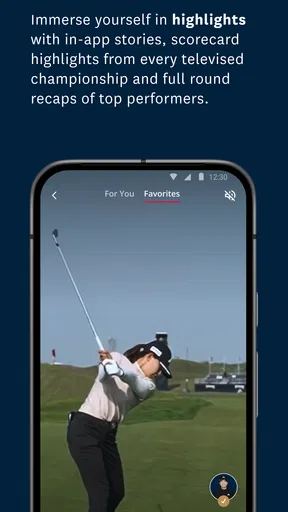
If you’re someone who enjoys learning through multimedia, you're in for a treat. The app offers a variety of video tutorials and interactive content. Whether you want to perfect your swing or understand the nuances of a particular rule, there’s a video for that. It’s like having a golf coach available 24/7.
Community and Social Features
Golf is as much about community as it is about the sport itself. The app includes a social component where you can connect with fellow golfers, share your scores, and even set up friendly competitions. It’s a great way to stay motivated and engaged with the sport.
Personal Experience
As I delved deeper into the USGA app, I found myself using it more than I anticipated. I was particularly impressed with the personalized tips section. After entering some details about my playing style, the app suggested specific drills to improve my game. It felt like having a personalized coach tailored just for me.
The rules section was a lifesaver during a recent game with friends. We had a dispute over a rule, and instead of pulling out a dusty rulebook, I quickly found the answer on my phone. My friends were impressed, and it kept the game moving smoothly.
Final Thoughts
Overall, USGA is a must-have for any golf enthusiast. Whether you're a weekend golfer or someone who takes the sport seriously, this app offers something for everyone. It’s packed with useful features, easy to use, and genuinely enhances your golf experience. So, if you're ready to take your game to the next level, give USGA a try. You won’t be disappointed!
Where it fits—and where I would look elsewhere
The strongest reason I would keep this app on my phone is its connection to USGA events and golf information. A casual fan who wants to follow those championships, or a player who often needs a rules reference, has a clear reason to open it. By contrast, someone whose everyday routine revolves around finding nearby courses, arranging tee times, or comparing local services may be better served by a golf app centered on those tasks. I see this as a specialist companion rather than a universal golf toolbox.
That difference also helps set expectations for the app’s learning content. Videos and rule explanations can make a tricky point easier to understand, but they are not a replacement for practice or one-to-one instruction when a swing problem needs a coach’s eyes. I would use a tutorial to explore an idea, then try it at the range and judge whether it actually helps. The practical value is in having guidance close at hand, not in expecting a phone to diagnose every part of a player’s game.
Make the useful parts easier to reach
When I’m preparing for a round, I would search a rules question using the specific situation or term I remember, then check the surrounding explanation rather than stopping at a matching phrase. That extra step matters because golf rulings can depend on the circumstances. The diagrams and videos are especially helpful when a written description feels abstract; I would use them to clarify the setup, not as a reason to skip reading the actual rule.
For score and handicap information, the useful routine is consistency. If I choose to track scores, I would enter them promptly and make sure I am using the correct personal details rather than letting different household members add results to one person’s record. That is a simple way to avoid muddled histories on a shared device. Before treating a displayed handicap as a definitive measure for a particular competition, I would also check the event’s own requirements.
One limitation of a feature-rich golf app is that it can tempt me to keep checking the phone instead of enjoying the round. I would decide in advance what I need it for—perhaps one rules lookup or a quick championship check—and leave the rest for after play. This keeps the app useful without turning a relaxed game into a string of interruptions.
Who should install it
I would recommend giving it a try if USGA championships are part of your sports routine, if you want a golf-focused rules reference, or if you are learning the game and like having visual explanations available. It can also be a handy shared household resource when several people are interested in golf but do not need separate, detailed personal records on the same phone.
I would hesitate if you rarely follow USGA events and already have a preferred app for the specific tasks you care about. Likewise, a golfer looking mainly for course navigation, tee-time reservations, or a dedicated coaching plan should compare alternatives before making this their main golf app. The free price makes trying it straightforward, but free does not mean it will replace a tool whose purpose better matches your routine.
A considered household verdict
For a family or group sharing a device, I think the best arrangement is to use the app for common golf interests—checking championship information, learning a rule, or watching relevant material—while keeping personal account details and score histories clearly separated. Before a child or guest uses it, I would review the active account and any information already entered. That modest check avoids an avoidable mix-up without pretending there are built-in family settings.
My overall view is positive, with a narrower recommendation than the original enthusiasm suggests: this is most worthwhile for people who want a USGA-centered golf companion, not for everyone who happens to play golf. Its mix of rules, learning material, and golf-related tools gives it several possible uses, while its official focus is what makes it distinctive. If that matches how you follow or play the sport, I’d keep it available; if your needs are mostly local-course logistics or highly personalized coaching, another app may deserve the space on your phone.
Pros
- User-friendly interface for easy navigation.
- Real-time updates on golf scores.
- Comprehensive course information available.
- Detailed player statistics tracking.
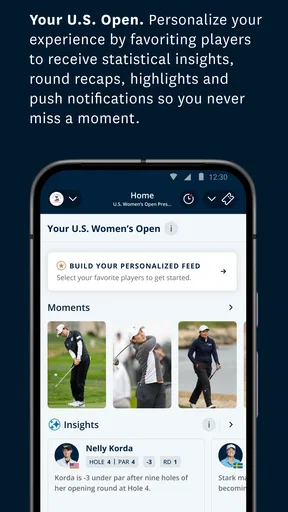
- Customizable notifications for events.
Cons
- Occasional lag during live updates.
- Limited offline functionality.
- Some features require subscription.
- High battery usage during play.
- Interface can be overwhelming for beginners.
FAQs for USGA
What is USGA and what does it offer?
USGA is a comprehensive app designed for golf enthusiasts, offering a range of features such as live scores, course statistics, and personalized game analysis. It provides users with access to official USGA rules and regulations, ensuring they stay informed and improve their skills. The app also includes social features for connecting with other golfers.
Is USGA available for both Android and iOS?
Yes, USGA is available for both Android and iOS platforms. Users can download the app from Google Play Store or Apple App Store, ensuring compatibility with a wide range of devices. Regular updates are provided to enhance user experience and add new features.
Does USGA require a subscription or is it free to use?
USGA offers both a free version and a premium subscription. The free version includes basic features like access to rules and live scores, while the premium subscription unlocks advanced analytics, personalized coaching tips, and ad-free browsing. Subscription prices vary, so check the app for current rates.
How user-friendly is the USGA app for beginners?
The USGA app is designed with user-friendliness in mind, making it accessible for beginners. It features a clean interface and easy navigation, with tutorials and help sections to assist new users. Whether you're a seasoned golfer or a novice, you’ll find the app intuitive and supportive.
What are the technical requirements to run USGA on my device?
To run USGA smoothly, ensure your device meets the minimum requirements: Android 6.0 or iOS 12.0 and above, along with at least 150MB of free storage. A stable internet connection is recommended for accessing live features and updates. Check for compatibility with your device on the app’s download page.


